Showing posts with label digital literacy. Show all posts

Thursday, March 26, 2020

Computer Skills Lessons for Beginners

If you fear computers, or if you think you don't know how to do much with a computer, Northstar can help you learn computer skills! A page that guides you to learning resources is always available here:

LINK: Learning resources for meeting Northstar computer literacy standards

However, due to the current COVID-19 restrictions, Northstar is making its own online interactive learning platform available to the general public. Normally one must be at a subscribing testing location to have access to these lessons. But for a month or two, you can click on the link below and start learning basic computer skills, or skip ahead to more advanced skills.


LINK: Northstar Online Learning

You can also test your knowledge of basic computer terms and skills by clicking the next link below. Click on "Take An Assessment." In the box labeled "Essential Computer Skills," click on "Basic Computer Skills" to take the first quiz. All the quizzes are interactive—it’s fun!


LINK: Northstar Digital Literacy Assessment of Basic Computer Skills

(Remember, these quizzes do not work on the Mozilla Firefox browser, because it won't run Adobe Flash Player. Use Google Chrome or Microsoft Internet Explorer instead).

Thursday, April 12, 2018

Test your computer skills at Northstar Digital Literacy

For these quizzes, make sure you are NOT using the Firefox browser (the quizzes won't work on Firefox). After you click on the purple LINK below  the pictures, scroll to the bottom of the page and click on this picture (first picture on the left). Then click Basic Computer Skills:


When the lesson loads, you will see this picture and you may hear sound:


Use headphones or turn off your computer's sound while in the computer lab.

Click NEXT, then click SKIP ORIENTATION (unless you want to go through the orientation).

Then you will be at the Module 1: Basic Computer Skills page. Click Start Now to begin the quiz. Questions are at the top of each page--follow the instructions. The quizzes are interactive--you click, drag, or do whatever actions you would do on an actual computer screen.

LINK: Quiz on basic computer knowledge


To test yourself on your knowledge of Microsoft Word, click the link above and scroll to the bottom of the page, to the middle picture (copied below):
                           

Then click on the Microsoft Word button.

If you see a message that says "Right-click to allow Adobe Flash Player to run" (this is software that plays images and video), click the right-hand button on your mouse. Then left-click on the word "Allow" to go to the Microsoft Word quiz. After you click "Next" and "Skip Orientation, click the "Start Now" button.


Below is a screenshot of the first question on the MS Word quiz:


Monday, August 28, 2017

Review Your Knowledge of the Windows Operating System

The website https://www.gcflearnfree.org/ has many tutorials on many subjects, including computer skills. No matter which version of Windows your computer uses, there are lessons and quizzes available online at this website or others.

My suggestions: If you need to learn about using the the Windows 8, Windows 8.1, or Windows 10 versions of this operating system, click on one of the links below. Each tutorial has a quiz at the end.

LINK: Free Windows 8 or 8.1 tutorial

LINK: Free Windows 10 Tutorial

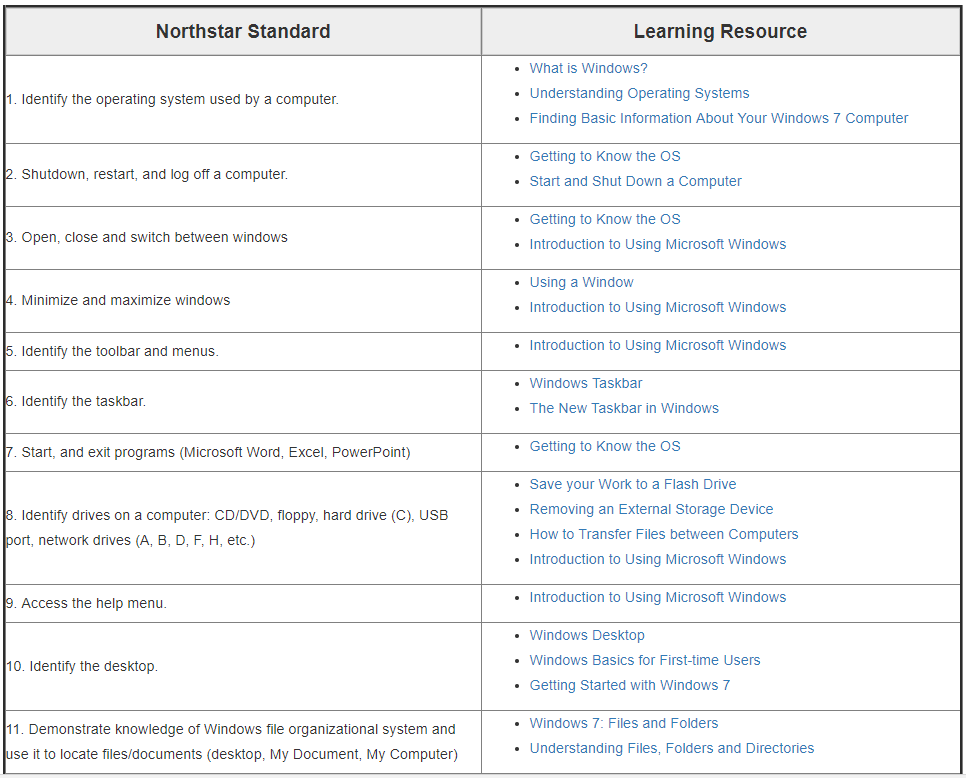
If you need to review your knowledge of the Windows operating system in general, the Northstar Learning Guide to Windows 7 on the St. Paul Public Library site is a great place to review.

LINK: Northstar Learning Guide: Module 3A: Windows 7
(picture of lessons chart below)


Afterward try the Northstar Digital Literacy Assessment for using Windows 7:

LINK: Northstar Digital Literacy Assessment for Windows 7

OR for using Windows 10:

LINK: Northstar Digital Literacy Assessment for Windows 10

Basic Online Tutorial for Mac OS X (Apple) Operating System

If you buy an iPad or an Apple desktop or laptop computer, you have to learn the operating system used on these products--Mac OS X (pronounced Mac OS ten). The St. Paul Public Library website directs you to the Northstar learning guides that teach basic computer skills, including both the Windows 7 and Mac OS X operating systems. These learning guides help you meet the Northstar Digital Literacy standards, which are widely recognized standards in adult education programs that teach computer skills.

NOTE: Sometimes the Mozilla Firefox browser (which won't run Adobe Flash Player software) doesn't work well with the Northstar online guides and tests that the St. Paul Public Library uses for teaching computer skills. Use Google Chrome or Microsoft Explorer instead.

My suggestion: Click on this link:

LINK: Learning Guide: Module 3B: Mac OS

You will see a chart like the one below, which matches the Northstar Learning Standards for using the Mac OS X operating system with links to learning resources that help you meet the standards. Click on the first link under Learning Resources (Using a Mac: What is an Operating System?) for a presentation.


Some of the links in the Learning Resource column on the right of the chart may present information you already know. When you think you know most of the information in the lessons, try the Northstar Digital Literacy Assessment (test) for the Mac OS X operating system by clicking HERE. 

(All Northstar assessments begin with an audio test to see if your computer's sound is working--you should see a picture of a piano and hear music playing.)

Monday, June 12, 2017

Test Yourself Against Digital Literacy Standards

In class we worked through a couple of the assessments (quizzes) on the Northstar website. We did the first module, on Microsoft Word, and the last module, on Information Literacy. Here is an explanation from the website itself: 


The Northstar Digital Literacy Project defines basic skills needed to perform tasks on computers and online. The ability of adults to perform these tasks can be assessed through online, self-guided modules. Included are basic computer digital literacy standards and modules in ten main areas: Basic Computer Use, Internet, Windows Operating System, Mac OS, Email, Microsoft Word, Social Media, Microsoft Excel, Microsoft PowerPoint, and Information Literacy.

My suggestion: Click on the link below and scroll down to where it says Jump in and launch  a module. Then click on one of the ten icons to take an assessment (your browser needs to have Adobe Flash enabled for you to take the assessments; Macintosh/iPad computers tend not to allow the Flash player, and Firefox has difficulty with it. The website recommends a browser other than Windows Explorer). 

Here is a picture of the icons (these are not links--the link is below, at the end of this post):


Note: Choose #3A if you use a Windows operating system on your desktop or laptop computer, or #3B if you have a Macintosh computer or iPad). 

LINK: Northstar Digital Literacy Assessment